Introducing Scheduled Reporting in Exchange: Your Data, Delivered on Your Schedule
We’re excited to announce the latest feature enhancement within Exchange — Scheduled Reporting — designed to help our multifamily partners access the insights they need, exactly when they need them.
Say Goodbye to Manual Report Pulls
For SatisFacts clients, staying on top of performance data just got a whole lot easier. Any report available for export in Exchange can now be scheduled for automatic delivery straight to your inbox — simply choose your preferred frequency (weekly, monthly, or quarterly), report period, and the specific communities you want included. Have the data that’s most important to you at your fingertips, at a moment’s notice.
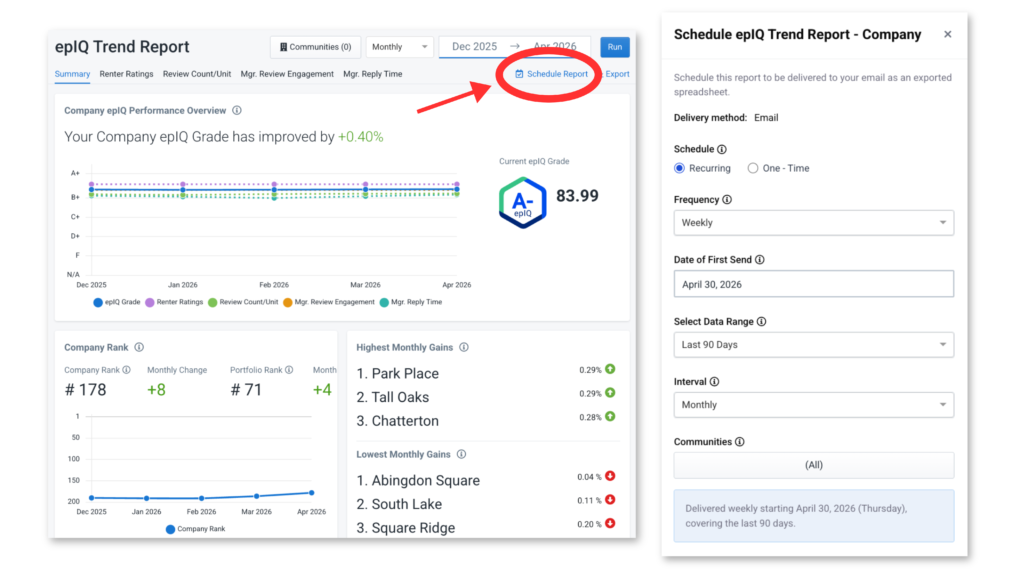
Exchange is already home to a wealth of invaluable performance data for your communities. With Scheduled Reporting, all of that information can now be delivered directly to your inbox on a customized schedule that works for you. Reports can include data on:
- epIQ Performance: Track how your communities stack up.
- Rating and Review Trends: Explore ratings movement, track % of Verified Reviews per community, and measure your teams’ level of engagement via responses.
- Survey Results: Keep a pulse on resident satisfaction trends.
- And much more!
Centralized Scheduled Report Dashboard
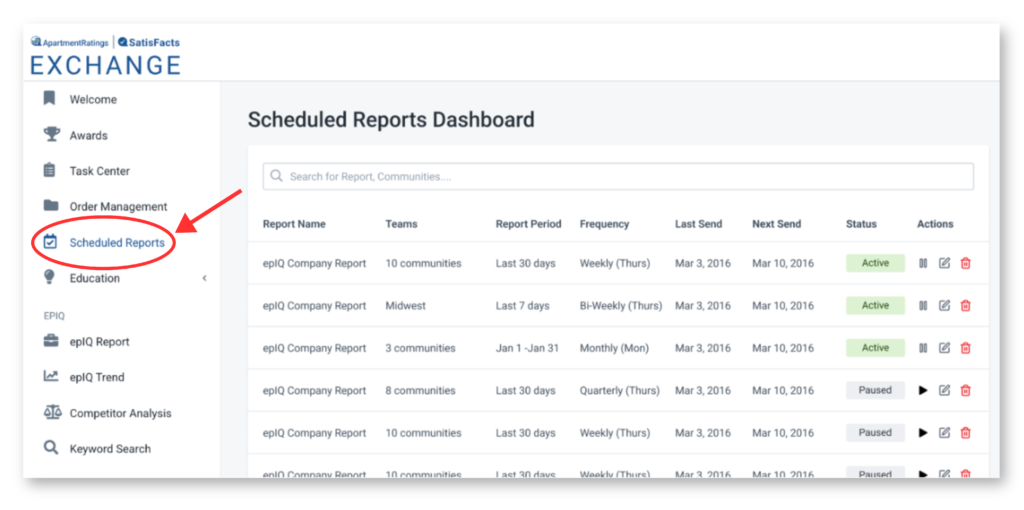
Plus, managing your scheduled reports is just as seamless as setting them up. A dedicated dashboard within Exchange gives you a centralized hub to view, search, and manage all of your recurring report schedules with ease. Key management features include:
- Edit schedules to adjust timing
- Pause reports temporarily without losing your configurations
- Delete reports you no longer need
- Improved visibility into community-level data and delivery timing
Scheduled Reporting was built with our multifamily partners in mind, streamlining workflows and ensuring that the right people have access to the right data at the right time. This feature empowers your team to stay proactive and data-driven without any extra effort.
And stay tuned — we’re continuously working to enhance Scheduled Reporting with even more functionality, including the ability to send reports to additional recipients beyond yourself!
Ready to get started? Log in to Exchange today and explore Scheduled Reporting. As always, our team is here to help if you have any questions.